
Monday, February 25, 2008

Monday, November 19, 2007
Putting up the tree
Getting a head start on the Christmas decorations this year.
Putting up the Christmas tree has always been something I look forward to every year. This year however, is the first time I'm putting up the Christmas tree together with my wife. We decided to keep things simple, and I think it looks pretty good.
Now that the tree is up, what's left is to fill up the empty space under the tree!


Sunday, November 18, 2007
Let it Snjor
Christmas is just around the corner, and what better way to bring some festive cheer to your desktop than having it snow!

Snjor, that's Icelandic for snow, lets you do just that. Once it's running, little white blobs will slowly, almost hynotically, fall across your desktop. You set the snow to lazily drift about on your screen or wreck havoc by bringing down a blizzard.
Tuesday, November 13, 2007
Leopard's Stacks - here's how to make it better
One of Leopard’s new features is Stacks. Stacks let you place any folder into the Dock and clicking on it will spring the contents of the folder in a Grid or a Fan. It’s quite visually pleasing, but it’s gotten some flack because you can’t assign an icon to a Stack. Instead, the icon would be of the latest file in the folder. And that makes it rather difficult to distinguish between different Stacks.

So... how do I tell which Stack is my Downloads folder?

Visually distinct Stacks, and the translucency is very attractive.
Here's how we do it. Before we proceed, we should define the Sort behaviour of the Stacks. So right click (or command click) on the Stack, and sort by date modified.

Get the icons from this link. The page is in Japanese, but you shouldn’t have any problem finding the link to download the icons.
Choose the icon we want, and place it into the Downloads directory. In the example below I’ve renamed the icon to download_icon. Since we want the latest item to be displayed first in a Stack, we’re going to use the Unix touch command to set the modification date to somewhere in the future. So fire up Terminal, and enter the following commands.
cd Downloads
touch –mt 202001010101.01 download_icon
This will change the modified date of the download_icon to the year 2020, January 1st, 1:01:01 am.
You can do this for other Stacks in the same manner.
I found out about this from Daring Fireball.
Update:
There's a second set of icons for Stacks. And this time, the icon's modified dates have already been set to the year 2010. So all you need to do is to sort the Stacks by modified date, and forget about the Terminal.
All the icons can be downloaded from optima-optica.

Friday, November 02, 2007
WriteRoom for distraction free writing
The month of NaNoWriMo is upon us, and budding writers around the world are prepping themselves to complete a novel within a month. The pace is fast, the enthusiasm is furious, and the writer has to be ready not to drift from the goal.
To do all that, all forms of distractions must be eliminated, and that's where WriteRoom shines. WriteRoom's tag is "Distraction free writing" and that's what you get. At first launch WriteRoom goes into fullscreen mode and all you get is a blinking green cursor and a black, empty background. No desktop, no browser, no email clients in sight. Just you and your text. It can't get any simpler than that.
 WriteRoom in fullscreen mode.
 WriteRoom in window mode.
There is a free version of WriteRoom and that was the version that I used all the while. I thought it served my needs - that's until I tried the shareware version. In my opinion, a great application is an application that caters to needs that I didn't even know I needed. The shareware version provides many more customisation and tweaks that really helps to improve the transition of your thoughts onto the screen.
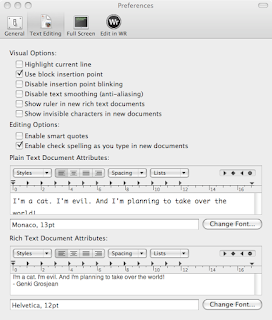
Just take a look at the customisations you can make to WriteRoom. I really like the "typewriter scrolling" option so your focus is always on the middle of the screen while the rest of the text scrolls upwards. You could also change the text and background colours but I like the retro green text on black background theme. It brings be back to the days when I first set my eyes on my first PC.

You can also use WriteRoom from other applications. There's an "Edit in WriteRoom" which is an Input Manager plugin. I'm not sure if this still works in Leopard since I've read Leopard doesn't support Input Managers any more. But if you're on Tiger, installing this Input Manager will add an "Edit in WriteRoom" menu item into the Edit menu of other applications. So if you're blogging in Safari, you can click the "Edit in WriteRoom" menu item, the text in the current web form will be transfered into WriteRoom for "distraction free writing". And when you're done, just save and close WriteRoom and the text you edited will be copied back to Safari. Pretty neat! Since this feature is not officially supported in Leopard, I can still use the Services menu. WriteRoom lets me copy text and use the Services menu to send the text to WriteRoom for editing. And when I'm done, it's just a copy and paste action. Quick and easy.
I did notice one inconsistency. Whenever I change the font in the Preference, the existing text in the document does not reflect the new font. I had to restart WriteRoom before the new font is properly displayed. Other than that, WriteRoom works great for me.
I've written this review in hopes of getting a free WriteRoom license. Hopefully I'll get it, but even if I don't get it, I had a great time reviewing the application.
To do all that, all forms of distractions must be eliminated, and that's where WriteRoom shines. WriteRoom's tag is "Distraction free writing" and that's what you get. At first launch WriteRoom goes into fullscreen mode and all you get is a blinking green cursor and a black, empty background. No desktop, no browser, no email clients in sight. Just you and your text. It can't get any simpler than that.
 WriteRoom in fullscreen mode.
 WriteRoom in window mode.
There is a free version of WriteRoom and that was the version that I used all the while. I thought it served my needs - that's until I tried the shareware version. In my opinion, a great application is an application that caters to needs that I didn't even know I needed. The shareware version provides many more customisation and tweaks that really helps to improve the transition of your thoughts onto the screen.
Just take a look at the customisations you can make to WriteRoom. I really like the "typewriter scrolling" option so your focus is always on the middle of the screen while the rest of the text scrolls upwards. You could also change the text and background colours but I like the retro green text on black background theme. It brings be back to the days when I first set my eyes on my first PC.

You can also use WriteRoom from other applications. There's an "Edit in WriteRoom" which is an Input Manager plugin. I'm not sure if this still works in Leopard since I've read Leopard doesn't support Input Managers any more. But if you're on Tiger, installing this Input Manager will add an "Edit in WriteRoom" menu item into the Edit menu of other applications. So if you're blogging in Safari, you can click the "Edit in WriteRoom" menu item, the text in the current web form will be transfered into WriteRoom for "distraction free writing". And when you're done, just save and close WriteRoom and the text you edited will be copied back to Safari. Pretty neat! Since this feature is not officially supported in Leopard, I can still use the Services menu. WriteRoom lets me copy text and use the Services menu to send the text to WriteRoom for editing. And when I'm done, it's just a copy and paste action. Quick and easy.
I did notice one inconsistency. Whenever I change the font in the Preference, the existing text in the document does not reflect the new font. I had to restart WriteRoom before the new font is properly displayed. Other than that, WriteRoom works great for me.

I've written this review in hopes of getting a free WriteRoom license. Hopefully I'll get it, but even if I don't get it, I had a great time reviewing the application.
Saturday, October 27, 2007
Serenity shows her spots
Installed Leopard into my 1.33 GHz iBook, Serenity. Against my better judgement I chose the Erase & Install option, and it's a lot of work getting everything back to the way I like them.
So far no show stoppers...

Monday, October 15, 2007
Temeraire

Temeraire, a historical fantasy set in the Napoleonic period, by Naomi Novik - my current favourite book. What is it about? Think of Lassie, toss in Russell Crowe from Master and Commander, and blend together the historical fantasy of Philip Pullman's His Dark Materials, and you get a rough idea of what Temeraire is about.
Temeraire is a story of Captain William Laurence, an up and coming Naval officer engaged with a beautiful fiancee, rising up society's ranks and highly praised officer in His Majesty's Navy. And how he gave everything up to be an aviator, an outcast of society, all for the friendship of a fighting dragon he named Temeraire, after the ship HMS Temeraire.
It doesn't take long before the story of the friendship between Captain Laurence and Temeraire seized my attention. Stories of dragons and people fighting together is not new, but Naomi Novik takes this premise and puts a new spin to it. Dragons and and their captains in her novel have such a bond that either would give their life for the other. And the story is set in the Napoleonic period, although I know nothing about the war, the sense of urgency and loyalty to King and country comes clearly through the prose. The story is quite easy to follow, so don't worry too much about not knowing anything about English history.
I was also pleasantly surprised by how dragons were used in the war. I assumed the dragon would have a rider and that was that. It was typical in most of the books I've read. But in Temeraire's world, dragons were like living flying ships. There would be the captain, his first officer, handlers, and crew. The crew would do their combat maneuvers on the dragon while in flight, secured to the dragon's harness by carabiners and leather straps. Delightfully unique!
Temeraire is the first in a series of books. The US edition has a change in title, Temeraire: His Majesty's Dragon. I rather prefer the simple title of Temeraire in the UK edition. I got my UK edition from Borders for a pricey RM40, but SP found books 2 and 3 of the Temeraire series from BookXcess in Amcorp Mall for only RM20 each! And the books SP bought for me were the larger versions, so I'd expect they would cost more than RM40 in normal bookstores.
Temeraire is a fun read. Pick it up if you find it. I'm already starting on the second book - Temeraire: Throne of Jade.
And something I recently discovered. Peter Jackson has gotten the rights to the Temeraire series, so a movie may be in the works. I can't wait.
Wednesday, October 10, 2007
Manly men wear kilts
I was listening to Buzz Out Loud at work when I heard something that caught my attention - Utilikilt. What's that? A kilt? For geeks? A quick Google search and I found Utilikilt's website.
Give the site a visit and get a mighty dose of testosterone. I can't blame the site for pumping up the macho macho manliness of wearing the Utilikilt because lets face it, not many of us would wear a kilt in public. Especially in Malaysia. We'd probably be stopped by the police for public indecency.
Still, I am intrigued.
At the back of my mind, the Utilikilt seemed familiar and no wonder! I've seen Patrick Norton from the old TechTV Screensavers wearing such a kilt. Much digging later my suspicion was justified. Here's a picture of the Screensavers team wearing kilts, taken from Dvorak Uncensored. image taken without permission... much apologies.

Give the site a visit and get a mighty dose of testosterone. I can't blame the site for pumping up the macho macho manliness of wearing the Utilikilt because lets face it, not many of us would wear a kilt in public. Especially in Malaysia. We'd probably be stopped by the police for public indecency.
Still, I am intrigued.
At the back of my mind, the Utilikilt seemed familiar and no wonder! I've seen Patrick Norton from the old TechTV Screensavers wearing such a kilt. Much digging later my suspicion was justified. Here's a picture of the Screensavers team wearing kilts, taken from Dvorak Uncensored. image taken without permission... much apologies.

Friday, September 28, 2007
Montblanc? No, Tesco!
I remember like it was yesterday. My dad brought me to our local supermarket to get my first fountain pen - a red Sheaffer. It must have cost quite a bit, but I was too young then, and today, I've no idea where's the fountain pen my dad bought for me. Too bad.
But my dad's actions so many years ago led to my fascination of fountain pens of late. After lying dormant for years, a spark of interest was struck on that fateful day in Amcorp Mall, 2 years ago. SP and I were browsing the stalls at the weekend flea market, and we were about to leave when something caught my eye. It was a tray of fountain pens, and a silver Montblanc stood out among the rest. Sure it must be a fake, but for RM10 I couldn't resist.
The Montblanc served me well these past 2 years, but I had trouble with the ink flow. It flowed too freely, forcing me to write much faster and larger than I like. But it was smooth and didn't give me any leaks.
But what's that got to do with the title?
A colleague of mine discovered that Tesco sells fountain pens, and they cost RM2.90. And each pack comes with 4 blue ink cartridges. What an amazing value! So today I rushed to Tesco and got one for myself. And I'm pretty happy with it.

The pen is made of smoked translucent plastic, with a rubber grip. I'd compare the quality of the plastic to be similar to what you'd get from a normal ballpoint pen. There's not much weight to it, but it's comfortable enough to write with.

The pack comes with 4 blue ink cartridges, but I'm thinking of swapping it with a piston filler. I think it will fit. The bundled ink is blue with a hint of purple - it's a nice "perky" blue.

The pen has an iridium tipped stainless steel nib. It's a little scratchy, but I think that will improve in time, when the ink reservoir is completely filled. Currently, the ink flow is less compared to my Montblanc, and that makes this pen suitable for my Moleskine. The ink doesn't spread onto the next page, and I can write at my own pace and write in my usual handwriting size.

Maybe fountain pens should make a comeback. Now that everyone is conscious about the environment, fountain pens make a good alternative to disposable pens. A bottle of ink should last much longer, and probably cheaper, compared to ballpoint pens.
But my dad's actions so many years ago led to my fascination of fountain pens of late. After lying dormant for years, a spark of interest was struck on that fateful day in Amcorp Mall, 2 years ago. SP and I were browsing the stalls at the weekend flea market, and we were about to leave when something caught my eye. It was a tray of fountain pens, and a silver Montblanc stood out among the rest. Sure it must be a fake, but for RM10 I couldn't resist.
The Montblanc served me well these past 2 years, but I had trouble with the ink flow. It flowed too freely, forcing me to write much faster and larger than I like. But it was smooth and didn't give me any leaks.
But what's that got to do with the title?
A colleague of mine discovered that Tesco sells fountain pens, and they cost RM2.90. And each pack comes with 4 blue ink cartridges. What an amazing value! So today I rushed to Tesco and got one for myself. And I'm pretty happy with it.

The pen is made of smoked translucent plastic, with a rubber grip. I'd compare the quality of the plastic to be similar to what you'd get from a normal ballpoint pen. There's not much weight to it, but it's comfortable enough to write with.

The pack comes with 4 blue ink cartridges, but I'm thinking of swapping it with a piston filler. I think it will fit. The bundled ink is blue with a hint of purple - it's a nice "perky" blue.

The pen has an iridium tipped stainless steel nib. It's a little scratchy, but I think that will improve in time, when the ink reservoir is completely filled. Currently, the ink flow is less compared to my Montblanc, and that makes this pen suitable for my Moleskine. The ink doesn't spread onto the next page, and I can write at my own pace and write in my usual handwriting size.

Maybe fountain pens should make a comeback. Now that everyone is conscious about the environment, fountain pens make a good alternative to disposable pens. A bottle of ink should last much longer, and probably cheaper, compared to ballpoint pens.
Saturday, September 22, 2007
iTunes throttled by Streamyx - The fix
I’m hooked on podcasts. They are like radio stations that I could download into my iBook and listen to them whenever I had time. Since there are so many podcasts to sort through and download, iTunes is a great tool to consolidate all my favourites.
All was fine and dandy until the day TM decided to start throttling P2P activities using methods only known to them. Somehow, through some freak of administrative and executive knee jerk reaction, downloading podcasts using iTunes got throttled as well.
 A common sight for me – unable to even load the iTunes Store.
I’ve made numerous calls to TM’s customer support, explaining to them what are podcasts and how I couldn’t download them using iTunes. I’ve received many suggestions and repeated requests for details about my PC and my modem, and I patiently answered all their questions. There was even a time when my report “I cannot download podcasts using iTunes” got scrambled in ways only TM customer support can manage, to “I cannot load iTunes website”. And the technician resolved my issue by trying to load http://www.itunes.com. Of COURSE it will load. After all that, I still didn’t have a solution to my problem.
A guy’s patience has its limits and for almost a year, I had to put aside my favourite podcasts, and left to wander aimlessly on the Internet, occasionally manually downloading individual MP3s of podcasts that I happen to stumble upon. But NO MORE!
Thanks to helpful Mac users from http://www.lowyat.net and http://www.mymug.org, I was shown a way to overcome the throttling. And with this method, it’s clear as day that Streamyx is throttling iTunes based on its user-agent string.
The Fix
First, you’ll need to download PAW (Pro Active Webfilter). It’s a Java application, so you’ll have to make sure you have Java installed on your Mac, or PC. My instructions below are for the Mac.
It comes as a zipped file. Unzip the file and copy the extracted folder into your Applications directory. I renamed the folder to paw. There are 2 important files in that folder:
 Just double click on paw-server.jar and that launches the PAW server. This server acts as a proxy server that strips away the user-agent ID of any applications that wants to make a connection to the Internet. But you’ll have to enable this setting. To do that, proceed to the next step.
Now you double click paw-gui.jar to launch the GUI.
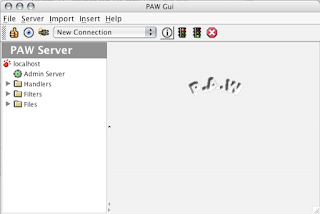
Click to headers-request in the Files directory, as shown below. You’ll want to delete the hash “#” on the user-agent you want. What this does is PAW will strip away the user-agent of the software that wants to access the Internet and replace it with the user-agent for Internet Explorer 6.0, in the case below.
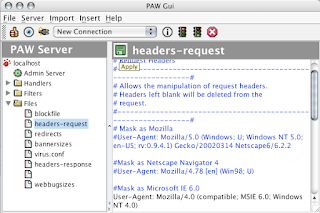
Don’t forget to click the green floppy button to apply your edits. Then click Sync to update the PAW server to your latest setting.

Now that the PAW server is running and you’ve configured the server using the PAW GUI, it’s time to make some changes on your Mac.
Launch System Preference, and double click Network. You maintain all your existing settings, but change the Proxies tab, as shown below. The Web Proxy Server you see is actually the PAW server. The DNS 127.0.0.1:8080 is what’s suggested by PAW in their documentation.
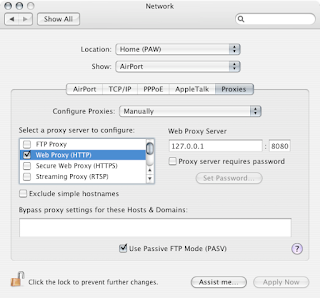
Normally I’d only run PAW when I want to update my podcasts. So I create a new Location on my Mac just for PAW.
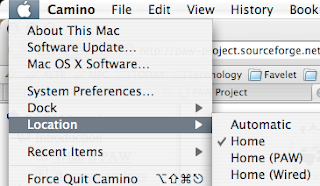
When I'm done, I go to the PAW GUI, click Stop PAW Server, and click Shutdown PAW Server to free any resources taken up by the PAW Server.
And the result?

Just like old times...
All was fine and dandy until the day TM decided to start throttling P2P activities using methods only known to them. Somehow, through some freak of administrative and executive knee jerk reaction, downloading podcasts using iTunes got throttled as well.
 A common sight for me – unable to even load the iTunes Store.
 I’ve made numerous calls to TM’s customer support, explaining to them what are podcasts and how I couldn’t download them using iTunes. I’ve received many suggestions and repeated requests for details about my PC and my modem, and I patiently answered all their questions. There was even a time when my report “I cannot download podcasts using iTunes” got scrambled in ways only TM customer support can manage, to “I cannot load iTunes website”. And the technician resolved my issue by trying to load http://www.itunes.com. Of COURSE it will load. After all that, I still didn’t have a solution to my problem.
A guy’s patience has its limits and for almost a year, I had to put aside my favourite podcasts, and left to wander aimlessly on the Internet, occasionally manually downloading individual MP3s of podcasts that I happen to stumble upon. But NO MORE!
Thanks to helpful Mac users from http://www.lowyat.net and http://www.mymug.org, I was shown a way to overcome the throttling. And with this method, it’s clear as day that Streamyx is throttling iTunes based on its user-agent string.
The Fix
First, you’ll need to download PAW (Pro Active Webfilter). It’s a Java application, so you’ll have to make sure you have Java installed on your Mac, or PC. My instructions below are for the Mac.
It comes as a zipped file. Unzip the file and copy the extracted folder into your Applications directory. I renamed the folder to paw. There are 2 important files in that folder:
 Just double click on paw-server.jar and that launches the PAW server. This server acts as a proxy server that strips away the user-agent ID of any applications that wants to make a connection to the Internet. But you’ll have to enable this setting. To do that, proceed to the next step.
Now you double click paw-gui.jar to launch the GUI.

Click to headers-request in the Files directory, as shown below. You’ll want to delete the hash “#” on the user-agent you want. What this does is PAW will strip away the user-agent of the software that wants to access the Internet and replace it with the user-agent for Internet Explorer 6.0, in the case below.

Don’t forget to click the green floppy button to apply your edits. Then click Sync to update the PAW server to your latest setting.

Now that the PAW server is running and you’ve configured the server using the PAW GUI, it’s time to make some changes on your Mac.
Launch System Preference, and double click Network. You maintain all your existing settings, but change the Proxies tab, as shown below. The Web Proxy Server you see is actually the PAW server. The DNS 127.0.0.1:8080 is what’s suggested by PAW in their documentation.

Normally I’d only run PAW when I want to update my podcasts. So I create a new Location on my Mac just for PAW.

When I'm done, I go to the PAW GUI, click Stop PAW Server, and click Shutdown PAW Server to free any resources taken up by the PAW Server.
And the result?

Just like old times...
Thursday, August 09, 2007
Hazy Dazy Days
Penang has been shrouded with haze for several days. And the buses and lorries that spew thick black clouds of soot aren't helping any. So I'm thankful that I get to stay indoors for most of the day. But then again, one can't be too careful.

On an encouraging note, a quick check on my weather forecast widget shows thunderstorm for the upcoming week. Here's hoping for rain.

On an encouraging note, a quick check on my weather forecast widget shows thunderstorm for the upcoming week. Here's hoping for rain.
Friday, July 27, 2007
Tuesday - Fried Chicken
Chicken has become so prevalent in our society that it has become generic. I don't think where chicken come from. I just know where to get them. And it's probably without a doubt that KFC, or Kentucky Fried Chicken for you older folks, makes the best tasting fried chicken.
However, going to KFC is not a simple affair. Nor is it cheap. That leads me to the point of this post. Every Tuesday, a van rolls up beside the road at the Sungai Nibong residential area and 2 men gets out and start preparing their chicken. One would do the frying, and the other would tend to the customers. And what customers. People would stand in line, sometimes up to the middle of the road, obstructing traffic and endangering themselves, all for the sake of fried chicken.
I've joined in the experience, and came away reasonably happy. The chicken is not as tasty as KFC's, but they're not too bad. They're not too greasy, pretty crispy on the outside, and juicy on the inside. But perhaps they could do better on the marinade because the chicken tastes like chicken - a little bland.
Don't go away thinking I dislike the chicken. No. For the price, I'm pretty happy with it. And every other Tuesday, I'd be among the crowd, risking my neck, for my piece of the chicken.


However, going to KFC is not a simple affair. Nor is it cheap. That leads me to the point of this post. Every Tuesday, a van rolls up beside the road at the Sungai Nibong residential area and 2 men gets out and start preparing their chicken. One would do the frying, and the other would tend to the customers. And what customers. People would stand in line, sometimes up to the middle of the road, obstructing traffic and endangering themselves, all for the sake of fried chicken.
I've joined in the experience, and came away reasonably happy. The chicken is not as tasty as KFC's, but they're not too bad. They're not too greasy, pretty crispy on the outside, and juicy on the inside. But perhaps they could do better on the marinade because the chicken tastes like chicken - a little bland.
Don't go away thinking I dislike the chicken. No. For the price, I'm pretty happy with it. And every other Tuesday, I'd be among the crowd, risking my neck, for my piece of the chicken.


Friday, July 20, 2007
Harry Potter - So The Drama
Yes, the next and final installment of the Harry Potter series is about to be unveiled tomorrow. And already, the drama has started.
According to The Star, several bookstores - MPH, Popular, Harris (never heard of them...) and Times - will NOT be selling Harry Potter and the Deathly Hallows tomorrow. Wow.
Here's an excerpt from the article:
According to The Star, several bookstores - MPH, Popular, Harris (never heard of them...) and Times - will NOT be selling Harry Potter and the Deathly Hallows tomorrow. Wow.
Here's an excerpt from the article:
MPH, Popular, Harris and Times at a press conference in Kuala Lumpur at 4pm announced that they would not sell Harry Potter and the Deathly Hallows in protest against Carrefour and Tesco selling the book at a hefty discount.
The recommended retail price of RM109.90 is being violated by hypermarkets advertising and selling it at RM69.90, the bookstores said.
Since Amazon is already selling the book at 50% discount, I'm going about to see if I can get a colleague who's over in US to get me a copy, and bring it back for me when he returns.
I've got the earlier 6 books the same way. Although books 1-5 were gotten in a not so ethical manner. It was like this. I ordered the set from Barnes & Nobles online. I was told it would take 2 weeks to deliver. 2 weeks came and passed, and naturally I was concerned. I emailed their customer support person and told them my predicament. To my relief, I was told they'd refund my money and that I could make another order. Guess what happened the next day? I received the package, and I got the refund!
In my defense, I did inform the customer support person that I've received the package and told them to take back my refund. Instead, I got a nice "Thank You" email from them, with hopes that I'd continue to purchase books from them.
There's no rush for me to get the 7th book. I've still got to refresh my memory, so I've started reading the 6th book since a few days ago.

Monday, July 09, 2007
Transformers, fun. Bakerzin, wanting.
Two and a half hours later, I was dusting popcorn crumbs off my shirt, SP was chatting with her colleague, and we were walking out of the cinema, after having watched Transformers. The caramel popcorn at GSC Queensbay is quite the treat. Sugary, crunchy and not a single unpopped corn to be found.
The movie was fun. And like the popcorn, the movie was meant to be enjoyed without being too critical. Big explosions, check. Big guns, check. Cheesy lines, check. Comedic relief, check. Eye candy, check. Good triumph over evil, check.
After the movie, the three of us decided to have dinner at Bakerzin. The place is sadly ostracized by Penangites. I wanted to try the Linguine Vongole that SP had during our first visit to Bakerzin. SP and her friend decided to try Bakerzin's new set menu. 2 side orders, 1 main dish, a dessert, a soup and a drink for $20. We thought it was quite a good deal, until we saw the portions. But wait. Before we go on a tirade about Bakerzin, think about it. You get to try so many flavours for only $20. It's not the best deal, but at least Bakerzin is trying.
I had the Linguine Vongole, so my portion was the largest. As much as I'd like to rave about Bakerzin, I'm afraid they let me down that night. Some of the clams had sand in them and the sauce was a little too plain for me. The Linguine Vongole was only average that night. The chef is not too consistent because the dish was very good on our first visit.
I wanted to order the Iced Chocolate Mint but was surprisingly persuaded NOT to order it. Very strange. So I ended up with the Iced Lychee Mint. It was refreshing, but seemed out of place with my Linguine Vongole.
Although it seemed we didn't enjoy our experience at Bakerzin that night, we did enjoy each other's company. In fact, we stayed and chatted until it was closing time. However the way we were asked to leave was a little crude. The waiter simply handed us the bill and mumbled something about closing time. Bakerzin could have handled it in a much more pleasant manner. Perhaps ask us if we wanted to order anything else since they were going to close the kitchen soon. That would be hint enough for us to know that they're going to close the restaurant.

However I had another opportunity to visit Bakerzin again, and this time I accompanied my sister. She's never tried Bakerzin so I suggested she try the Linguine Vongole. Wary of my last experience at Bakerzin, I asked the waitress to inform the chef about my preference for the sauce and I'm glad to say that I got the quality I had expected from Bakerzin. And my sister enjoyed the dish.
I also managed to order the Iced Chocolate Mint, and I did enjoy it. Chocolatey and minty, with some ice cubes to temper the sweetness of the chocolate.
I'm not sure if we'll ever visit Bakerzin again. Perhaps for their dessert and cakes. I'm just discouraged by the inconsistencies of their dishes.
The movie was fun. And like the popcorn, the movie was meant to be enjoyed without being too critical. Big explosions, check. Big guns, check. Cheesy lines, check. Comedic relief, check. Eye candy, check. Good triumph over evil, check.
After the movie, the three of us decided to have dinner at Bakerzin. The place is sadly ostracized by Penangites. I wanted to try the Linguine Vongole that SP had during our first visit to Bakerzin. SP and her friend decided to try Bakerzin's new set menu. 2 side orders, 1 main dish, a dessert, a soup and a drink for $20. We thought it was quite a good deal, until we saw the portions. But wait. Before we go on a tirade about Bakerzin, think about it. You get to try so many flavours for only $20. It's not the best deal, but at least Bakerzin is trying.
I had the Linguine Vongole, so my portion was the largest. As much as I'd like to rave about Bakerzin, I'm afraid they let me down that night. Some of the clams had sand in them and the sauce was a little too plain for me. The Linguine Vongole was only average that night. The chef is not too consistent because the dish was very good on our first visit.
I wanted to order the Iced Chocolate Mint but was surprisingly persuaded NOT to order it. Very strange. So I ended up with the Iced Lychee Mint. It was refreshing, but seemed out of place with my Linguine Vongole.
Although it seemed we didn't enjoy our experience at Bakerzin that night, we did enjoy each other's company. In fact, we stayed and chatted until it was closing time. However the way we were asked to leave was a little crude. The waiter simply handed us the bill and mumbled something about closing time. Bakerzin could have handled it in a much more pleasant manner. Perhaps ask us if we wanted to order anything else since they were going to close the kitchen soon. That would be hint enough for us to know that they're going to close the restaurant.

However I had another opportunity to visit Bakerzin again, and this time I accompanied my sister. She's never tried Bakerzin so I suggested she try the Linguine Vongole. Wary of my last experience at Bakerzin, I asked the waitress to inform the chef about my preference for the sauce and I'm glad to say that I got the quality I had expected from Bakerzin. And my sister enjoyed the dish.
I also managed to order the Iced Chocolate Mint, and I did enjoy it. Chocolatey and minty, with some ice cubes to temper the sweetness of the chocolate.
I'm not sure if we'll ever visit Bakerzin again. Perhaps for their dessert and cakes. I'm just discouraged by the inconsistencies of their dishes.
Monday, July 02, 2007
The wine for our wedding
A few months before our wedding, I chanced upon a Rose wine from Chile - Miguel Torres San Medin Cabernet Sauvignon Rose. We discovered that we enjoyed this particular wine and naturally we decided it would be the wine we'd serve at our wedding dinner reception.
SP made some calls to find out the distributor for the Torres wine, and discovered it was in KL. We left several messages, found ourselves being pushed from one person to another, and finally we found out we could easily get the wine from Penang. No need for transporting boxes from wine from KL, all the way to Penang.
And where in Penang did we get these wines? Sunshine Square. And we even got some discount and a free wine glass for every bottle we bought. It was quite an experience for us, carting the boxes of wine in our shopping trolley.
As soon as we got home, we were so concerned about the proper way to store the wine. The sommelier suggested a dark, cool place would be the best conditions for the wine. And so the wine went into our second room. The place is normally cool, and it's quite dark once the curtains are drawn.


We brought the wine to Lone Pine the day before our wedding so that the people at Lone Pine could keep the wine chilled until they were served. The wine was quite popular at our wedding dinner reception. All the bottles were finished, and everyone had their fill.
So right now we more wine glasses than we need at home, and they're still in their boxes. Maybe they'll come in handy when we have company... and then there's that bottle of Sparkling Rose in the fridge...
SP made some calls to find out the distributor for the Torres wine, and discovered it was in KL. We left several messages, found ourselves being pushed from one person to another, and finally we found out we could easily get the wine from Penang. No need for transporting boxes from wine from KL, all the way to Penang.
And where in Penang did we get these wines? Sunshine Square. And we even got some discount and a free wine glass for every bottle we bought. It was quite an experience for us, carting the boxes of wine in our shopping trolley.
As soon as we got home, we were so concerned about the proper way to store the wine. The sommelier suggested a dark, cool place would be the best conditions for the wine. And so the wine went into our second room. The place is normally cool, and it's quite dark once the curtains are drawn.


We brought the wine to Lone Pine the day before our wedding so that the people at Lone Pine could keep the wine chilled until they were served. The wine was quite popular at our wedding dinner reception. All the bottles were finished, and everyone had their fill.
So right now we more wine glasses than we need at home, and they're still in their boxes. Maybe they'll come in handy when we have company... and then there's that bottle of Sparkling Rose in the fridge...
Wednesday, June 13, 2007
Some Mac Geekery
2 years. That's how long I've been a Mac user. Serenity, my trusty iBook, has been serving me well considering that she's hardly ever been turned off since the first day I pressed the power button.
Only recently I've started getting the urge to indulge the inner geek in me, and here's what I've got to show - my desktop, running GeekTool.
GeekTool is probably mainly used to monitor your system because it allows you to display unix commands output onto your desktop. It also lets you display contents of text files and images. Pretty geeky looking, but it's really useful for me.
Let me guide you through my desktop. On the top right corner, I display the date and time. Previously I displayed the date and time on the menu bar like everyone else, but on a 12-inch notebook, screen area is precious. Removing the date and time from the menu bar and putting them on the desktop freed up more space on my menu bar, making it less cluttered.

Then on the top center portion of the screen displays the currently playing song on iTunes. Normally I have iTunes minimised when I'm listening to music. So it's pretty useful for me to check what song's playing, and to check if I've paused iTunes before I remove my headphone jack in the office. Achieving this on GeekTool is a little more complicated, but if I can do it, so can you.
And the last part at the bottom of the screen shows the 10 running processes on Serenity. It's not really useful for me, but sometimes I like to see what application is chewing up my CPU cycles.
I got all the Shell Commands and scripts from Lifehacker and other internet resources that I forget. But do a Google and explore for yourself.
Only recently I've started getting the urge to indulge the inner geek in me, and here's what I've got to show - my desktop, running GeekTool.
GeekTool is probably mainly used to monitor your system because it allows you to display unix commands output onto your desktop. It also lets you display contents of text files and images. Pretty geeky looking, but it's really useful for me.
Let me guide you through my desktop. On the top right corner, I display the date and time. Previously I displayed the date and time on the menu bar like everyone else, but on a 12-inch notebook, screen area is precious. Removing the date and time from the menu bar and putting them on the desktop freed up more space on my menu bar, making it less cluttered.
Shell Command to display the date:
date "+%a %b %d, %I:%M %p"

Then on the top center portion of the screen displays the currently playing song on iTunes. Normally I have iTunes minimised when I'm listening to music. So it's pretty useful for me to check what song's playing, and to check if I've paused iTunes before I remove my headphone jack in the office. Achieving this on GeekTool is a little more complicated, but if I can do it, so can you.
Save the script below into a directory of your choice, eg ~boysbytes/Documents/GeekTool_iTunes.scpt
Enter this script into Script Editor.
tell application "System Events"
set powerCheck to ((application processes whose (name is equal to "iTunes")) count)
if powerCheck = 0 then
return "iTunes not running"
end if
end tell
tell application "iTunes"
try
set playerstate to (get player state)
end try
if playerstate = paused then
set trackPaused to " (paused)"
else
set trackPaused to ""
end if
if playerstate = stopped then
return "Stopped"
end if
set trackID to the current track
set trackName to the name of trackID
set artistName to the artist of trackID
set albumName to the album of trackID
set totalData to artistName & " - '" & trackName & "' on " & albumName & trackPaused
return totalData
end tell
And in GeekTool, enter this Shell Command:Still with me? Next up is my TO DO list. This is simply a text file todo.txt that I put into my Documents folder. Then I tell GeekTool to poll this file every few minutes.
osascript /Users/boysbytes/Documents/GeekTool_iTunes.scpt
The Shell Command to display my todo.txt.The same for the list of TV shows that I follow.
cat ~boysbytes/Documents/todo.txt
And the last part at the bottom of the screen shows the 10 running processes on Serenity. It's not really useful for me, but sometimes I like to see what application is chewing up my CPU cycles.
Shell Command to display top 10 processes, their CPU and memory utilisation.Remember! Don't set your polling interval too frequently, or it will tax your system. Give a reasonable frequency. In my case, I update my Date and Time every minute, my todo.txt every 5 minutes, iTunes every 30 seconds, and refresh my top 10 processes every 30 seconds.
top -FR -o cpu -n 10 -l 2 | tail -11
I got all the Shell Commands and scripts from Lifehacker and other internet resources that I forget. But do a Google and explore for yourself.
Wednesday, May 30, 2007
Wedding scrap book
Since we agreed not to have a professionally photographed wedding album, we decided to make a scrapbook of our lives - as individuals, as a couple, as well as of our families and friends.
So a couple of weeks before the Big Day, we brushed aside the cobwebs in our cupboard, blew away the layers of dust off the container that kept all our old photographs. It was quite a trip down memory lane.
We bought a nice wedding album from MPH with pages already pre-cut for us to put our photos. But we felt the layout was too restrictive for our mad, mad imaginations, so SP had a fabulous idea of making decorative backing for each page with nice wrapping papers. Now we could paste our photos any way we want.
Both of us put our thoughts and our version of the memories we had together - the vacation we took to Langkawi, Redang, Bukit Tinggi (now Berjaya Hills), our trips back home to our families, fun times with friends, and our Registration of Marriage.
I don't know if any of our guests actually browsed through the book, but both of us had fun preparing the scrapbook.


So a couple of weeks before the Big Day, we brushed aside the cobwebs in our cupboard, blew away the layers of dust off the container that kept all our old photographs. It was quite a trip down memory lane.
We bought a nice wedding album from MPH with pages already pre-cut for us to put our photos. But we felt the layout was too restrictive for our mad, mad imaginations, so SP had a fabulous idea of making decorative backing for each page with nice wrapping papers. Now we could paste our photos any way we want.
Both of us put our thoughts and our version of the memories we had together - the vacation we took to Langkawi, Redang, Bukit Tinggi (now Berjaya Hills), our trips back home to our families, fun times with friends, and our Registration of Marriage.
I don't know if any of our guests actually browsed through the book, but both of us had fun preparing the scrapbook.


Tuesday, May 29, 2007
Wedding biscuit
These has to be the best tasting wedding biscuit I've ever had. SP's mom ordered these for all her relatives who attended our wedding reception in KL.
The wedding biscuits come in pairs, and are presented in a handy box with handles. There were some extras, so we took a few back for ourselves. The skin was thick and just flaky enough that it doesn't crumble in your hands. And the lotus and black bean filling wasn't too sweet.

The wedding biscuits come in pairs, and are presented in a handy box with handles. There were some extras, so we took a few back for ourselves. The skin was thick and just flaky enough that it doesn't crumble in your hands. And the lotus and black bean filling wasn't too sweet.

Monday, May 28, 2007
Our wedding speeches
We decided to prepare a speech for our wedding reception, and what better way to get our creative juices flowing than lounging at Starbucks, sharing a cup of coffee, writing our thoughts into our little Moleskines.
And wouldn't you know it, that on the day of our wedding reception, the speech we gave was totally different from the speech we originally wrote at Starbucks.


And wouldn't you know it, that on the day of our wedding reception, the speech we gave was totally different from the speech we originally wrote at Starbucks.


Saturday, May 26, 2007
Just Married
We're a married couple for three weeks now. How time flies. We were busy bees during the weeks prior to the wedding day - rushing to the cake shop, dashing to the hotel, making sure the preparations in KL and Penang are ready, ordering flowers, converting the other bedroom into a makeshift wine cellar...
So I think you'd understand why the long silence in the blog. More details to come in the following weeks, months, years, but until then, here's a short slideshow of our Chinese wedding reception at Overseas Restaurant in KL, our wedding at the Cathedral of the Holy Spirit in Penang, and our dinner wedding reception at Lone Pine, Penang.
So I think you'd understand why the long silence in the blog. More details to come in the following weeks, months, years, but until then, here's a short slideshow of our Chinese wedding reception at Overseas Restaurant in KL, our wedding at the Cathedral of the Holy Spirit in Penang, and our dinner wedding reception at Lone Pine, Penang.
Subscribe to:
Posts (Atom)


